Live Preview · Real-Time Visual Support · Insurance
See What the Customer Sees.
Guide Them in Real Time.
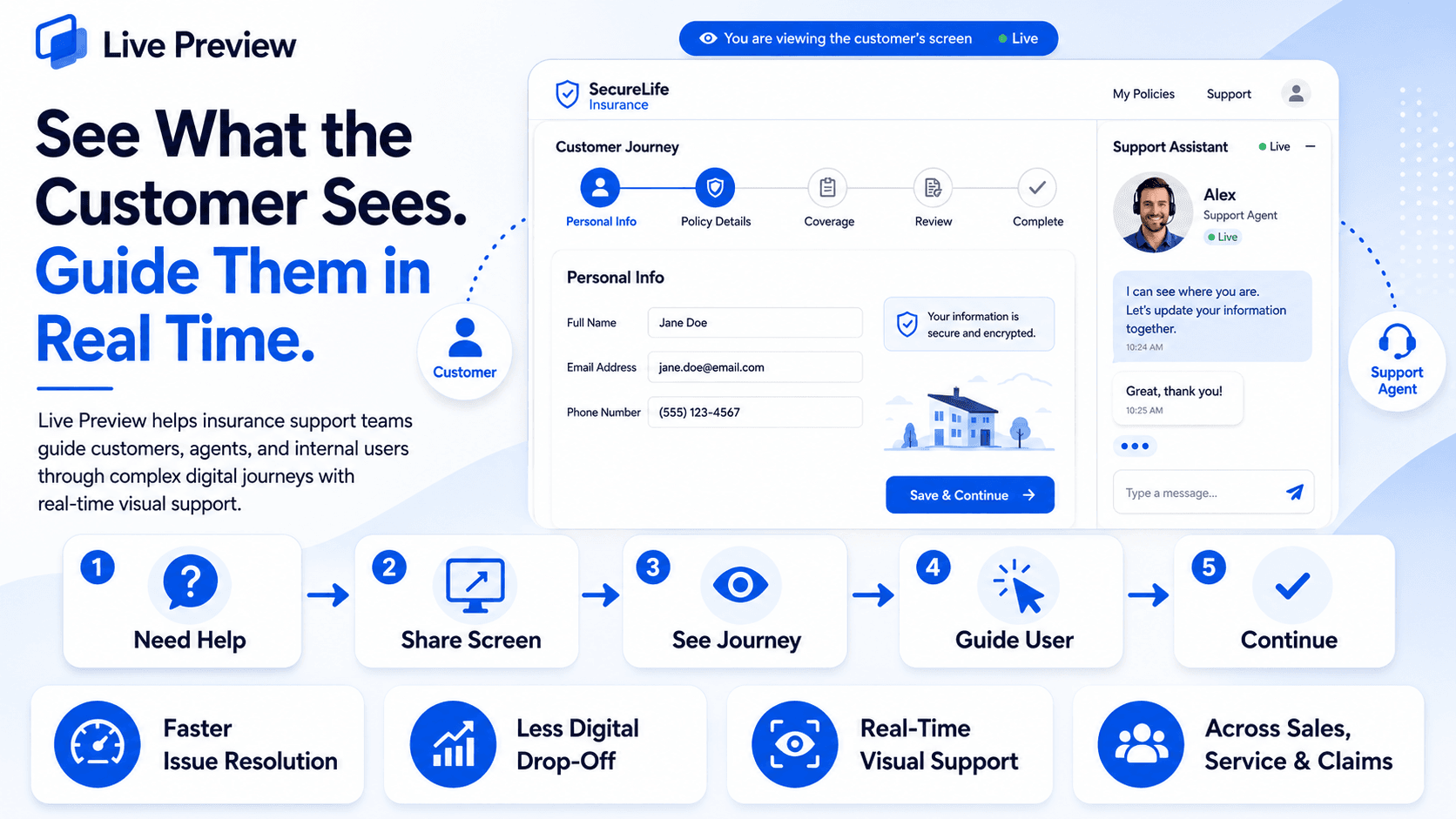
Live Preview helps insurance support teams guide customers, agents, and internal users through complex digital journeys in real time.

Why insurance teams use Live Preview
Real-Time Visual Support
See the relevant screen or digital journey while assisting the user.
Faster Issue Resolution
Understand where the user is stuck instead of diagnosing the problem only through conversation.
Less Digital Drop-Off
Guide customers through difficult quote, application, claim, or servicing steps before they abandon the journey.
Support Across the Insurance Lifecycle
Use visual assistance across sales, onboarding, servicing, claims, documents, billing, and portal support.
The Problem
Support Gets Harder When You Can’t See Where the Customer Is Stuck
Insurance companies continue to move more customer journeys online.
But digital self-service does not mean every customer can complete every journey without help.
When something goes wrong, support representatives often have to understand the problem through phone calls, screenshots, emails, or lengthy verbal explanations without being able to see where the customer is actually stuck.
That creates friction for both the customer and the support team.
Where It Breaks Down
Where Traditional Digital Support Starts Breaking Down
These problems appear when support teams have to guide complex digital journeys without real-time visual context.
The Agent Cannot See the Actual Problem
The Customer Has to Explain Where They Are Stuck
Customers may struggle to explain which page, button, field, message, or error is causing the problem.
Support Starts With Diagnosis Instead of Resolution
Agents first have to understand what the customer is seeing before they can help solve the issue.
Different Screens Create More Confusion
The customer and support representative may be referring to different steps or different parts of the journey.
Small Navigation Issues Become Longer Conversations
A simple issue can take much longer when the agent has no visual context.
Verbal Guidance Is Difficult for Complex Journeys
“Click Here” Is Not Always Clear
Explaining navigation through voice alone becomes difficult when a page contains multiple fields, sections, buttons, and documents.
Insurance Journeys Can Be Long
Quote forms, applications, claims, servicing requests, and document submissions may require several steps.
Customers Can Enter Information Incorrectly
Misunderstood instructions can result in incorrect form completion or document submission.
Customers May Need to Repeat the Process
Errors created during the first attempt can lead to additional calls, corrections, or resubmissions.
Customers Drop Out of Digital Journeys
Complex Forms Can Become a Barrier
Customers may begin a quote or application but struggle when they reach a difficult question or process step.
Moving to Another Channel Breaks the Journey
Switching from website to phone or email can interrupt the context of what the customer was already doing.
Self-Service Still Needs Human Assistance
Some customers need help even when the digital journey itself is working correctly.
The Customer May Abandon Instead of Asking Again
When getting help becomes difficult, completing the journey can feel harder than leaving it.
Support Effort Increases Across Teams
Agents Spend Time Explaining Navigation
Skilled support staff can spend significant interaction time helping users locate fields or understand where to go next.
Screenshots and Emails Slow the Conversation
Customers may have to capture screenshots, send files, or explain the issue repeatedly.
The Same Issues Can Reach Multiple Teams
A customer may move between sales, service, technical support, claims, or operations before the problem is understood.
Agent and Broker Portals Create the Same Challenge
The problem is not limited to policyholders. Agents, brokers, and internal users can also struggle with complex portals and workflows.
Where this goes next
See how Live Preview solves thisThe Solution
Live Preview for Real-Time Insurance Support
Live Preview is a secure screen-sharing and co-browsing solution that allows the relevant digital journey to be shared with a support representative in real time.
Instead of asking the user to explain every step, the representative can visually understand where they are stuck and guide them through the process.
See Where the User Is Stuck
Give the support team the missing visual context.
The representative can see the relevant screen or digital journey while assisting the user.
Guide in Real Time
Move from verbal directions to visual assistance.
Support teams can guide users through insurance applications, servicing, claims, and other digital processes while the journey is happening.
Keep Support Inside the Journey
Help the customer continue instead of starting again elsewhere.
Visual support can reduce the need to move repeatedly between website, phone, email, screenshots, and other channels.
Support More Than Policyholders
The same visual-support model can help distribution and internal users.
Live Preview can also support insurance agents, brokers, and internal teams navigating complex portals.
Demo
See Live Preview in Action
Watch a quick demo to see how Live Preview helps support teams view the user’s journey and guide them in real time.

After the walkthrough
Get in TouchBusiness Impact
What Digital Friction Costs the Insurance Operation
Customer Drop-Off
A customer who cannot complete the journey may abandon it.
Complex quote, application, or onboarding journeys can interrupt conversion before the process is completed.
Higher Support Handling Time
Agents spend more time understanding the problem before solving it.
Without visual context, even simple navigation issues can take longer to diagnose and resolve.
Form & Submission Rework
Incorrect inputs create additional work later.
Errors during applications, claims, or document submission can require corrections, repeated customer contact, and additional handling.
Lower Digital Self-Service Adoption
A digital journey does not create value if customers cannot confidently complete it.
Repeated difficulty can push customers back toward assisted channels.
Slower Issue Resolution
Small digital problems can become long support interactions.
When the agent cannot see where the user is stuck, more time is spent explaining, checking, and identifying the issue.
Higher Support Effort
Navigation problems consume skilled support capacity.
Sales, service, claims, and support teams spend more time helping users navigate processes instead of resolving the actual request.
Better visual context means faster guidance, fewer journey interruptions, and less support effort.
Core Features
Core Features of Live Preview
Real-time visual support across complex insurance journeys.
Real-Time Screen Sharing
Let the support representative see the relevant user screen.
The user can share the screen or digital journey needed to explain the problem.
Co-Browsing Support
Help users navigate the digital experience while they remain in the journey.
Support teams gain visual context without depending entirely on verbal descriptions.
Quote & Application Assistance
Help customers complete difficult purchase journeys.
Visual guidance can support users when entering information, understanding steps, or navigating a quote or application process.
Customer Onboarding Support
Guide customers through setup and required onboarding steps.
Support representatives can visually assist where the digital onboarding journey becomes unclear.
Policy Servicing Assistance
Help customers navigate servicing journeys more easily.
Live Preview can support customers when completing policy-related requests through digital portals.
Claims Assistance
Provide visual help during digital claim journeys.
Customers can receive support while navigating claim registration and related digital steps.
Document Submission Support
Help customers submit the right information in the right place.
Visual guidance can reduce confusion when uploading documents or completing supporting information.
Billing & Payment Support
Provide visual assistance when customers need help navigating billing or payment journeys.
Support teams can better understand where the user is having difficulty.
Agent & Broker Portal Support
Extend visual assistance beyond end customers.
Agents and brokers can receive support while navigating distribution or servicing portals.
Cross-Journey Support
One visual-support approach across sales, service, and claims.
Live Preview can support different digital insurance workflows instead of being limited to one stage of the customer lifecycle.
How It Works
The User Shares the Journey. The Support Team Sees Where Help Is Needed.
The User Needs Assistance
A customer, agent, broker, or internal user reaches a point in the digital insurance journey where additional support is required.
The Relevant Screen Is Shared
The user shares the relevant screen or digital journey with the support representative.
The Representative Sees the Same Context
Instead of relying only on a verbal explanation, the representative can visually understand where the user is in the process.
The Problem Is Identified
The representative identifies the page, step, field, document area, or process point causing difficulty.
The User Is Guided in Real Time
The representative guides the user through the required next steps while the journey remains visible.
The Digital Journey Continues
The user can continue the application, servicing, claim, document submission, or other workflow with assistance.
Process
- Need Help
- Share
- See
- Guide
- Continue
Next step
Guide Customers in Real TimeAt a Glance
The Whole Live Preview Support Journey on One Screen
How the shared journey looks to the customer and to the support representative at each step.
Insurance Journeys
Where Live Preview Can Be Used
Sales
- Quote journeys
- Policy applications
- Policy purchase assistance
Onboarding
- Customer onboarding
- Information capture
- Digital journey guidance
Policy Service
- Policy servicing
- Customer portal support
- Billing and payment assistance
Claims
- Claim registration
- Claim journey support
- Document submission
Distribution
- Agent portal support
- Broker portal support
- Partner journey assistance
Internal Operations
- Internal user support
- Complex workflow navigation
- Digital process assistance
How We Compare
Most Support Channels Tell the Agent What the Customer Says. Live Preview Shows Where They Are Stuck.
Swipe to compare →
| Capability | Phone / Email Support | Generic Screen Sharing | Live Preview |
|---|---|---|---|
| Real-time visual context | Limited | Yes | Built around real-time visual support |
| Identifying where the user is stuck | Verbal explanation | Shared screen | Relevant journey visible during support |
| Insurance journey support | Agent dependent | Generic | Sales, service, claims, documents and portals |
| Quote / application assistance | Verbal guidance | Possible | Designed to support digital insurance journeys |
| Claims journey assistance | Verbal / screenshots | Possible | Visual guidance during claim-related processes |
| Document submission support | Email / verbal | Possible | Support while navigating submission steps |
| Agent / broker portal support | Separate support | Possible | Applicable to distribution portals |
| Staying within the digital journey | Often interrupted | Depends on setup | Designed to support the user while the journey continues |
| Support context | What the user describes | What is shared | Relevant screen + ongoing support interaction |
The Difference
Phone support depends on the customer explaining where they are stuck.
Email and screenshots show only part of the journey.
Generic screen sharing provides visibility.
Live Preview brings real-time visual assistance into insurance sales, servicing, claims, and distribution journeys so support teams can see where help is needed and guide the user forward.
Who It Is For
Who Can Use Live Preview?
Insurance Companies
Support customers across digital sales, servicing, and claims journeys.
Life Insurers
Assist customers through applications, onboarding, servicing, and policy-related digital processes.
Health Insurers
Provide visual support across customer portals, servicing, claims, and document journeys.
P&C / General Insurers
Support quote, policy, claim, and servicing interactions across digital channels.
MGAs
Provide visual assistance across customer and distribution workflows.
Insurance Brokers & Agencies
Support customers and internal teams through complex digital journeys.
TPAs & Claims Administrators
Help users navigate claims, documents, and servicing processes.
Large Insurance Contact Centres
Give support representatives visual context when resolving complex digital queries.


Get Started
Stop Guessing Where the Customer Is Stuck. See It. Guide It. Resolve It.
Give your support teams the visual context they need to help customers, agents, and internal users complete complex insurance journeys more easily.
See the Journey. Guide the User. Resolve Faster.
Meet Our Innovators:
We aim to revolutionize how businesses operate through digital technology driving industry growth and positioning ourselves as global leaders.
Insurnest
Empowering insurers, re-insurers, and brokers to excel with innovative technology.
Insurnest specializes in digital solutions for the insurance sector, helping insurers, re-insurers, and brokers enhance operations and customer experiences with cutting-edge technology. Our deep industry expertise enables us to address unique challenges and drive competitiveness in a dynamic market.